
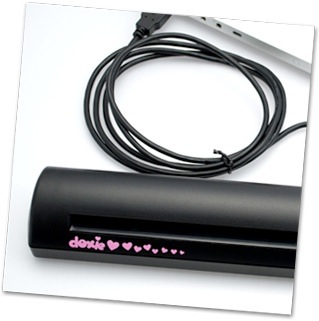
At my age, I’m not worried too much about what folks think about me. So I’ll use the Doxie scanner with its girl-y look if I want to, darn it, because it works.
The Doxie (http://www.getdoxie.com) is a paper scanner designed for homes and small businesses. The US$129 portable scanner is for scanning, sharing, and organizing paper and photos.
It’s also — dare I say — cute as a button with its pink heart design. Guys, your wives, girl friends and daughters will love the look. And you’ll love its performance, though if you’re using it out in public, you may want to be chowing down on a big ol’ burger to, you know, show your manliness to the world at large.
Okay, enough about the looks. And the scanner does come with a pack of six designer skins so you can replace the pink hearts, if you wish (I’d recommend the wood grain skin). The other interesting thing about the Doxie is its compactness. It’s model thin, weighs 10.9 ounces and is built for travel. When my wife saw it, she didn’t think anything that slim could be a “real” scanner. But the Doxie is.
Admittedly, at this size and price, you’re not going to get the results of a high-end, high-priced and bigger scanner. But the Doxie does well for what it’s designed to do — with some caveats.
The Doxie doesn’t come with a CD. To start scanning, you need to download and install the software. Once that’s done, plug one end of the USB cable into a powered USB hub or directly into your Mac, and you’re good to go. There’s no power supply involved as the scanner runs off USB juice. You will have to calibrate the Doxie software by placing a special piece of paper into the scanner face down and pushing the Doxie button (which, yes, is heart shaped).
The Doxie is compatible with any Mac (OX 10.5 or 10.6) or PC and has USB connectivity. Doxie integrates directly with desktop and web apps like Google Docs, Flickr, iPhoto, Tumblr, Picnik, Evernote, Picasa, and Backpack. A single button, Doxie’s Heart Button, implements sharing.
Doxie’s features include: color scanning at up to 600 dpi with automatic page detection; included software for simple scanning and direct cloud sharing; integration with the free Doxie’s Cloud service for turning paper into URLs for instant sharing; automatic cropping, rotation, and image clean-up; photo editing with direct support for the Picnik online photo editing suite; and the ability to save as PDF, JPEG, or lossless PNG.
The hardware and software is a breeze to use. You pick whether you want to scan a text document or photo, then set the resolution of the scan. You can scan at up to 600 dpi. The Doxie default settings are 300 dpi for photos and 200 dpi greyscale for text. Insert the doc or photo to be scanned into the wide slot in the front of the scanner. After you’ve scanned the item you wish, you can choose where to save it.
The greyscale scanning works great, producing crisp, dark scans. Scanning photos is a little more problematic. On occasion, scanned images have slight, white streaks down one side, and I have to recalibrate the Doxie to eliminate them. Also, photo scans tend to be a bit on the dark side.
The Doxie comes with an USB cable, guide, leatherette case (which is, in case you’re interested, heart free), photo scanning sleeves, and the aforementioned pack of six designer skins.
If you want a mobile scanner that can handle both black-and-white and color docs reasonably well, this is your baby. Especially as its small enough to take on the road.
Rating: 8 out of 10
— Dennis Sellers

