
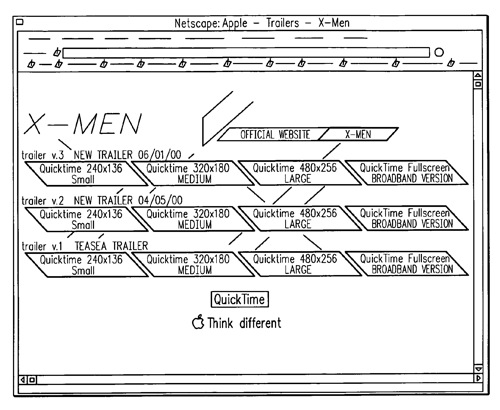
Apple has won a QuickTime related patent from the US Patent & Trademark Office for “One-Click Full Screen Video.” The invention provides a method and system for playing full-screen video on a user computer.
The method includes displaying in the user interface at the user computer a web page containing at least one link to electronic video file, selecting the link to request the video file, downloading the video file to user computer in response to the request, detecting by the user computer receipt of the video file, opening in the user interface to window of the video player in full-screen mode in response to the detecting, and reading the video file by the player to play the video in the window.
A feature of the present invention is that the video player may not have its preferences preset by the user to open in any particular mode. The mode in which the video player opens will be determined by the downloaded video file. The inventors are Robert Douglas Werner, Daniel Marusich and Greg Gilman.
Here’s Apple’s summary of the invention: “The present invention relates generally to the viewing in real-time of video content as it is being downloaded from the Internet and, more particularly, to the launching of a video player in full screen mode without user interaction to view the video after requesting its download.
“The viewing of video content on the Internet continually becomes more popular as the available bandwidth for content providers increases. For example, a news content provider may provide a video of a news story reported live from the location of the news event, similar to the reporting of televised news broadcasts. In such example, a user at a user computer connected to the Internet, through a web browser executing at the user computer, would access the web page of a news service provider, and then read such web page scanning for headlines and abstracts of news stories of particular interest. Typically, the headline of the story is set forth as a hypertext link. Selecting of the link in the user interface, such as by positioning a mouse pointer over the link and clicking the appropriate mouse button, would direct the user to an additional web page containing full text of the desired news story. The additional web page may contain a link to a video file to enable the user to view selectively the ‘live report,’ or be encoded to automatically download the video file to the user computer.
“Upon the start of the download of the video file, the web browser would detect the receipt of the header of the video file. For the web browser to play to the video file, typically the web browser has been programmed with a helper or browser plug-in which reads the video file and displays the corresponding video in the browser window. Alternatively, the web browser plug-in launches a video player which plays the video in a separate window, usually overlaying the browser window.
In many such examples, similar to the one described above, the quality of the displayed video is of low resolution and is typically displayed in a “postage stamp” window. The low resolution quality is a result of the lack of bandwidth necessary to transmit a sufficient number of pixels to the user computer such that a larger image can be viewed in real-time.
The video file is typically encoded with separate audio and video tracks. For any given time segment of the video, the number of bytes required for the video track far exceeds the number of bytes of the audio track. Real time viewing requires that each track be decoded simultaneously as the video file is being contemporaneously downloaded and played such that the audio and video tracks remain synchronized to each other. Delays in transmission of the video file, caused either by insufficiency of bandwidth or network interruptions, may cause the player to pause playing of the video file until the next frame of data has been received or disconnect completely from the connection with the server from which the video file is being downloaded.
“The effect of any such delays may be mitigated by buffering the downloaded electronic data prior to it being read by the video player. As electronic data on the video file is first downloaded, it is temporarily stored in a buffer. The reading of such data by the video player is delayed until a sufficient number of bytes of data have been temporarily stored in the buffer. Ideally, the time rate of reading of the bytes by the video player should not exceed the time rate of storing such bytes in the buffer. Accordingly, the buffer would always contain a number of bytes such that, should any bandwidth or interruption delay occur, there should always be a sufficient number of bytes for the video player and sufficient read without resulting in a pause or disconnect. However, depending on the display size of the video image, for the larger the display size the more bytes that are needed for each frame of data, there may be an insufficient number of bytes in the buffer to prevent such pause or disconnect.
“With use of the highest connection speed dial-up modem to connect the user computer to the Internet, there is not much bandwidth available for displaying the video image in real-time much larger than the postage stamp image described above. Otherwise, should the user desire to view a much larger image, the user must download the video file first, and only after the complete video file has been downloaded may the user launched the player and play the video. However, digital subscriber line and cable modem service is becoming more readily available to users. The bandwidth increase of the digital subscriber line and cable modem service will allow for the transmission of more bytes for each frame of video data while enabling the video player to play the video contemporaneously with the download of the video data.
“There have been attempts in the prior art to utilize the available bandwidth for the presentation of full-screen video. One such attempt does allow the user to view full-screen video during the download of such video. However, the video player must have its preferences changed by the user to display in full-screen mode the video being downloaded. This change of preferences must occur prior to the actual download in the video. Once the preferences have been changed, the video player cannot be used to view other videos which are not in full-screen mode. Another such attempt claimed that full-screen videos had been accomplished with a novel video player, however, the player window displayed a substantial amount of border adjacent to screen area in which the video is played.
“Accordingly, it is desirable to provide a method and apparatus in which the user can download a video file, and view the corresponding video in real-time irrespective of the screen size which such video requires for viewing. It is also desirable to provide a method and apparatus which does not require the user to change preferences of the video player prior to downloading any such video.
“According to the present invention, a method for playing full-screen video on a user computer includes displaying in the user interface at the user computer a web page containing at least one link to electronic video file, selecting the link to request the video file, downloading the video file to user computer in response to the request, detecting by the user computer receipt of the video file, opening in the user interface to window of the video player in full-screen mode in response to the detecting, and reading the video file by the player to play the video in the window.
“A feature of the present invention is that the video player may not have its preferences preset by the user to open in any particular mode. The mode in which the video player opens will be determined by the downloaded video file.”

![[NPL] Lasso 2.5.2 Update](https://www.mactech.com/wp-content/themes/Extra/images/post-format-thumb-text.svg)