By ‘Doctor Dave’ Greenbaum
In the early days of Macintosh computing, the displays were black and white, the systems booted off a floppy, and the keyboards were noisy. That familiar “clickety-clack” of someone typing was as familiar as the whirring of the 3.5 inch floppy.
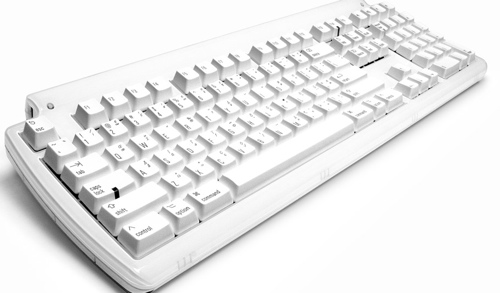
Today we have displays with rich vibrant colors, drives operate off solid-state devices, and keyboards are silent. However for some of us, the keyboards are one giant step backwards, and the Matias Tactile Pro keyboard (http://matias.ca/tactilepro3/index.php) is a giant step back in time that moves serious typists forward.
The TactilePro compares itself to the last great keyboard made by Apple, the Apple Extended II. The premium keyswitch used in the TactilePro is noisy because it’s a mechanical switch. Serious typists prefer a mechanical switch because it gives strong auditory and physical feedback when you press a key.
Apple’s current keyboard requires an extremely light touch of the keys and feels “mushy.” Over
the years my words per minute seriously declined because my hands would get tired after a long typing session, and I’d often miss keys because I was trying to be too light and pulled up to soon on the keys.
On the Tactile Pro, the keycaps are sculpted so that you can easily feel the difference and spaces between the keys. Your finger can clearly find the edges and return to the proper concave position in the middle of the key.
The keys are also laser etched so the paint won’t wear off over time. I hate how all my keyboards certain letters have completely worn off. While I’m a touch typist I hate how ugly the keys look. This is not a problem with the TactilePro.
Besides the mechanical keyswitch, the TactilePro has other serious enhancements professional Mac users will appreciate. The keyboard has a large footprint to ensure your hands don’t feel cramped, and you have plenty of room to rest your hands comfortably. Personally, when I
type on my Macbook keyboard my big hands constantly cramp because my fingers are simply too close together. The TactilePro allows my hands to spread out.
Similar to other Apple keyboards, the TactilePro provides volume control and eject keys that don’t require drivers and the control, option and command keys are clearly marked without the annoying Windows counterpart. Two USB ports on either side allows attachments of peripherals just like most other keyboards. The white color doesn’t match the current aluminum scheme of Mac’s design but it doesn’t contrast with it either. White is always in fashion.
This quality and comfort comes at a comparatively steep price of US$150 retail. While Apple includes a keyboard free with most Macs or charges $50 to buy it separately, the Apple Extended II was $163 back in the early 1990s. A serious typist will find the TactilePro quite a bargain when they factor in the increased productivity and decreased fatigue this outstanding keyboard provides. I can’t believe I lived without this keyboard for so long.
Pros: Tactile feedback from a mechanical switch, laser etched keys
Cons: Cost, color choices
Rating: 10 out of 10