
Turn the iPad into a netbook with KeyFolio
TweetFollow Us on Twitter

Turn the iPad into a netbook with KeyFolio


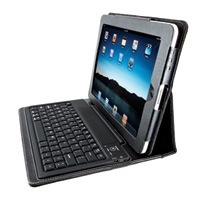
The iPad is crimping sales of netbooks, even though it doesn't have a keyboard. However, Kensington (http://www.kensington.com) has introduced the KeyFolio, a wireless Bluetooth Keyboard and case for the Apple tablet that effectively turns it into a netbook (don't tell Steve Jobs). It's a folio case, stand and keyboard all in one.

It costs US$99.99 and not only protects your iPad when on the road but also provides a wireless Bluetooth keyboard and hands-free stand when you reach your destination. The rubberized keys were specially designed to cushion your iPad screen from bumps and scratches when the folio is closed.

The KeyFolio has a synthetic leather cover and provides full access to all iPad controls and 30-pin connector. The rubberized keys are spill-proof, and the Bluetooth keyboard delivers wireless operation and includes iPad specific keys.

The adjustable stand holds the iPad in landscape mode, which is both good and bad. If you want to use the KeyFolio to type in portrait mode, you're out of luck.

Setting up the KeyFolio is easy. You insert the iPad in the keyboard sleeve, and turn the on/off switch on. When you first turn on the keyboard, both the Power Indicator Light and the Bluetooth Status Indicator Light glow for three seconds. You can't connect the keyboard to your iPad until only the Power Indicator Light glows.

Then, on your iPad, tap Settings. Open Bluetooth and make sure Bluetooth is on. On the keyboard, press the Connect button. The Bluetooth Status Indicator Light starts blinking. The keyboard now appears on your iPad screen. Tap Bluetooth Wireless Keyboard. Your iPad screen displays a passkey. Enter the passkey on the keyboard, and press Enter.

Your iPad screen shows the keyboard as Connected. On the keyboard the Bluetooth Status Indicator Light turns off. You can now use your keyboard to type in any app.

What's nice is what if the devices are connected and you turn the iPad off, the devices are still connected when you turn the keyboard back on. You can just start typing to use the keyboard.

Likewise, if the devices are connected and you turn your iPad off, the devices are still connected when you turn the keyboard back on, and you can just start typing. However, if the devices are connected and turn Bluetooth off on the Apple tablet, when you turn Bluetooth back on, you'll have to connect the devices again.

The KeyFolio is built for power conservation. If the keyboard sits idle for 15 minutes when it's connected to your iPad, the keyboard goes into a "dormant" state. Press and hold the Connect button for three seconds to "wake it up."

As far as I can ascertain the KeyFolio will run about as long as an Apple Wireless Keyboard running on batteries. Of course, you will have to charge it occasionally, and it come with a charging cable for just that.

The magnet-free folio case ensures uninterrupted operation of the iPad's digital compass. And the synthetic leather cover offers solid, good-looking protection.

I certainly won't recommend the KeyFolio if all you need is a case. If you only occasionally need to type on the tablet and (like me) can't get used to the virtual keyboard, just buy an Apple Wireless Keyboard. But if you use your iPad as a laptop replacement or use the iOS version of Pages, the KeyFolio should be a must-have on your list.

Rating: 8 out of 10

-- Dennis Sellers

 
AAPL
$546.08
Apple Inc.
-7.10
GOOG
$628.93
Google Inc.
+17.82
MSFT
$29.90
Microsoft Corpora
-0.31
MacNews Search:
Community Search:
view counter

view counter
view counter
view counter
view counter
view counter
view counter
view counter
view counter

Adobe Proto Review
Adobe Proto Review By Jennifer Allen on May 16th, 2012 Our Rating: :: SHALLOWiPad Only App - Designed for the iPad A great app to demonstrate around potential clients, but lacking in functionality.   | Read more »
Adobe Collage Review
Adobe Collage Review By Jennifer Allen on May 16th, 2012 Our Rating: :: LIMITINGiPad Only App - Designed for the iPad A nice idea and easy to use but far too limited.   | Read more »
Fish Runner Review
Fish Runner Review By Jennifer Allen on May 16th, 2012 Our Rating: :: SIMPLEUniversal App - Designed for iPhone and iPad A simple endless runner that isn’t quite as welcoming as it could be.   | Read more »
Shake Out Review
Shake Out Review By Jason Wadsworth on May 16th, 2012 Our Rating: :: SHAKEN BUT NOT STIRRINGiPhone App - Designed for the iPhone, compatible with the iPad A simple game where players shake a bunch of balls around to crush ticking time bombs before they explode.   | Read more »
Exponential Invasion Review
Exponential Invasion Review By Kevin Stout on May 16th, 2012 Our Rating: :: MORE LEVELS!Universal App - Designed for iPhone and iPad Exponential Invasion is a math-based puzzle game slightly reminiscent of Sudoku.   | Read more »
Dance Like a Dingo with Frisky’s New Ele...
Frisky, the electronic music internet radio station, is now available on iOS with an eponymous app. Frisky comes with two distinct flavors of stations to listen to: Frisky and Chill. Frisky is for high-energy dance music, boasting the same shows from the DJs scheduled on the Frisky website. Chill is programmed to slow things down, keep things cool... | Read more »
Track 8 Review
Track 8 Review By Kevin Stout on May 16th, 2012 Our Rating: :: BEAUTIFUL Track 8 is a Metro-style music player for the iPad.   Developer: Ender Labs Price: $1.99 Version Reviewed: 1.0.1 Device Reviewed On: iPad (third-generation) | Read more »
See The Effects Of Pregnancy With Preggo...
The App Store is far from low on filtering apps that adjust users’ images in numerous quirky ways. PreggoBooth is one such new addition but it does so with some pretty neat results. The app enables the user to see how they’d look if they were pregnant and at various stages of pregnancy. Refreshingly for such an app, there aren’t any freak results... | Read more »
HungrySquid Review
HungrySquid Review By Sinan Kubba on May 16th, 2012 Our Rating: :: TENTACLASSiPhone App - Designed for the iPhone, compatible with the iPad Clever-looking hexagonal twist on Pipe Mania, but…   | Read more »
The Portable Podcast, Episode 137
Kickstart my heart! On This Episode: Carter and Brett Nolan discuss the recent uprising of Kickstarter projects around iOS and the gaming world in general. Carter talks about the new game Damn You Dragons! with developer Mark Peterson, discussing their launch strategy and thoughts on Android as well. Episode Cast: Host: Carter Dotson Co-Host:... | Read more »
All contents are Copyright 1984-2010 by Xplain Corporation. All rights reserved. Theme designed by Icreon.

