Kool Tools: Window Tidy For Mac OS X
TweetFollow Us on Twitter

Kool Tools: Window Tidy For Mac OS X


Tired of switching between documents and wishing you could just see 'em all at once? Then Light Pillar's (http://www.lightpillar.com/) Window Tidy 1.0 (its first app for Mac OS X) may be for you.

Window Tidy is an integrated extension to the OS X window management system. Its icon sits in the Mac menu bar; you click it to access the software's preferences.

Window Tidy offers a way to arrange, tile and organize windows without having to remember hotkeys. Window Tidy's customizable layouts allow a window to be positioned and resized using nothing but drag and drop.

You can arrange on application windows on your Desktop onto a customizable grid. When you want to reposition a window, you just drag and drop it onto customizable pop-up Layout Icon and it snaps into that layout. You can create any number of layouts, each with its own grid size.

You give your layout a name and then adjust the grid division. Then drag across the grid to specify a screen layout.

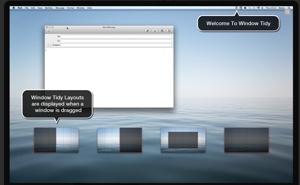
When a window is dragged, Window Tidy displays the available layout options. Dropping a window on the desired layout applies it to the dragged window, so it's easy to organize all the windows on-screen. (By the way if you try to drag a layout smaller than the window can occupy, you'll get a warning.)

When you drag a window onto another screen, the Layout Icons move to the new screen. When you drop the window on a Layout Icon the window is moved into position on the screen containing the layouts. Windows can be moved onto a new monitor and have a layout applied via -- you guessed it -- drag and drop.

You can add, delete and move windows. You can also set a variety of usage options and even a custom wallpaper.

If you work with multiple monitors, Window Tidy can accommodate you. When working with multiple screens, sometimes windows get lost, perhaps because one monitor is powered off. With Window Tidy, windows can be moved onto a different screen and a layout applied via drag and drop. The app also provides a function to recover windows from inactive screens by moving the window onto the display that contains the mouse cursor.

If you want to apply a different layout to a window, but don't plan on using it often, you can apply a Quick Layout. This can be triggered from the Window Tidy menu or by using a global hotkey. When triggered, a window pops up so you can drag the grid area you want the active window to occupy. When you release the mouse button the layout is applied.

Quick Layout can be configured to appear at the mouse cursor location. That's useful on Apple laptops as it minimizes the mouse movements needed to apply a layout.

Window Tidy requires Mac OS X 10.5 and is compatible with Mac OS X 10.7 ("Lion"). It's being offered at 25% off for an introductory price of $10.99 and available worldwide exclusively through the Mac App Store in the Utilities category.

 
AAPL
$431.77
Apple Inc.
-0.23
GOOG
$900.62
Google Inc.
+14.37
MSFT
$34.98
Microsoft Corpora
-0.02
MacNews Search:
Community Search:
view counter

view counter
view counter
view counter
view counter
view counter
view counter
view counter
view counter

World War Z Game Drops Its Price To A Bu...
World War Z Game Drops Its Price To A Buck For The Movie’s Release Posted by Andrew Stevens on June 18th, 2013 [ permalink ] | Read more »
Runaway: A Road Adventure Review
Runaway: A Road Adventure Review By Campbell Bird on June 18th, 2013 Our Rating: :: COMBINE ITEMS TO WINUniversal App - Designed for iPhone and iPad Runaway is a classic, old-school adventure experience, for better and for worse.   | Read more »
Pinball Rocks HD Review
Pinball Rocks HD Review By Blake Grundman on June 18th, 2013 Our Rating: :: QUARTER MUNCHERUniversal App - Designed for iPhone and iPad When players have the chance to buy free balls at the end of a game, that speaks volumes about the motivations of pinball game’s publisher.   | Read more »
Minecraft Realms Server Slots Are Beginn...
Minecraft Realms Server Slots Are Beginning To Open, But Slowly Posted by Andrew Stevens on June 18th, 2013 [ permalink ] | Read more »
Videon Review
Videon Review By Jennifer Allen on June 18th, 2013 Our Rating: :: GREAT ALL-ROUNDERiPhone App - Designed for the iPhone, compatible with the iPad Offering mostly everything one could want from a video recording app, Videon is quite the success.   | Read more »
The Portable Podcast, Episode 190
Flatter than ever! In This Episode: Carter and co-host Brett Nolan talk about the big announcements from WWDC, including iOS 7. Will it be a huge change to iOS? As well, the announcement of MFi gamepad support in iOS is discussed – will it herald major things for iOS gaming in the near future?   Episode Cast: Host: Carter Dotson Co-Host: Brett... | Read more »
Apple Approved Game Controllers Only Mak...
I’m all for game controllers for iOS devices, for what it’s worth. I’ve got a few of them, and they are all gathering dust. The issue with controllers for mobile devices is that they never get used. Not even for the games that are better when played with them. The controller is another device to carry, have batteries for, and connect. Mobile games... | Read more »
CIA: Operation Ajax Gives Readers Free A...
CIA: Operation Ajax Gives Readers Free Access To The Interactive Comic Posted by Andrew Stevens on June 18th, 2013 [ permalink ] | Read more »
Youda Survivor Drops Its Price For A Mag...
Youda Survivor Drops Its Price For A Magical, Limited Time Only Posted by Andrew Stevens on June 18th, 2013 [ permalink ] iPad Only App - Designed for the iPad | Read more »
Galaxy At War Online Review
Galaxy At War Online Review By Rob Rich on June 18th, 2013 Our Rating: :: THE FAMILIAR FRONTIERUniversal App - Designed for iPhone and iPad Galaxy At War Online has all the familiar trappings of many compelling freemium games. The problem is that it’s a very familiar formula. And it’s not actually free at the moment.   | Read more »
All contents are Copyright 1984-2010 by Xplain Corporation. All rights reserved. Theme designed by Icreon.