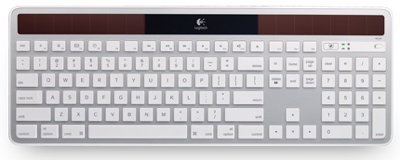
Logitech’s US$59.99 Wireless Solar Keyboard K750 for Mac (http://macte.ch/MjdS9) will tempt you if:
You want a keyboard that doesn’t require a physical connection OR batteries.
You want a full-sized keyboard with a numeric keypad.
3) You have lots of room on your desktop OR you don’t use an Apple Magic Trackpad.
The K750 sports onboard solar cells that power the keyboard using ambient light — even indoor lighting. I unpacked it and, as soon as paired with the Mac, it immediately worked. No wired USB connection (more on that in a moment). No batteries. No software installation required.
Logitech says the K750 will work up to three months in total darkness. I’ll take their word for it, as I never work in total darkness and know of no one who does. The keyboard — which is svelte enough that, at first glance, you might think Apple guru Jonathan Ive designed it — is available in five flavors: silver with dark grey solar panels, black with dark grey solar panels, white with blue solar panels, white with green solar panels and (my least favorite) white with pink solar panels.
You can download a free Solar App from the Mac App Store that offers instant info about battery levels. Plus, it alerts you when you need more light. The Solar App is very useful, and I’d highly recommend it if you spring for the K750.
The keyboard’s keys are where you’d expect them to be, including music and brightness controls, command keys and the eject button. The Logitech device is a 2.4GHz wireless keyboard, which adds to its convenience.
With its solar power design, the K750 is a “green” keyboard, and it sports other eco-friendly features. It touts PVC-free construction and a fully recyclable box. In fact, the three-step set-up process for the keyboard is printed on the inside cover of the box.
If you use one of Apple’s Magic Trackpads, combining it with a K750 will take up quite a bit of desktop real estate. The latter is a full size keyboard, as compared to Apple’s Wireless Keyboard — which is a better companion to the Trackpad. You’ll also be using an extra USB port with the Logitech keyboard, as it requires you to plug a USB stick into your Mac to pair the two devices.
There’s also an “optional” USB extender stick that comes with the K750 keyboard. At least it’s supposed to be optional, but the Solar App wouldn’t recognize the keyboard without it installed.
The USB extender is designed to improve reception by reducing possible radio-frequency interference, so perhaps there was some sort of interference in my office. To connect the USB extender:
° You plug the Unifying receiver into the female end of the USB extender stick.
° Plug the male end of the USB extender into a USB port on your computer.
So is the Logitech K750 Solar Keyboard for you? If you meet the criteria at the top of this article, definitely. If you’re an ardent of the Magic Trackpad or make it just fine using rechargeable batteries (and you do use rechargeables, don’t you?), not so much.
Rating: 8 out of 10
— Dennis Sellers