
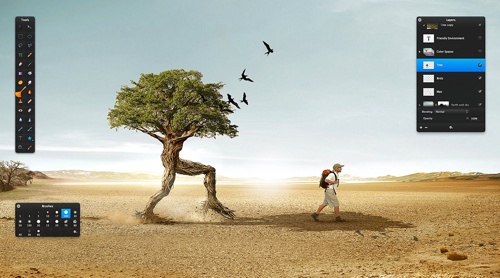
Pixelmator (http://www.pixelmator.com) has long been my graphics editing program of choice. The app has only gotten better with version 2.0, which was released this week.
Launch the application and you’re presented with an iMovie-style set of choices: Create New Image, Open Existing Image or Open Recent Image (the latter replaces the former Start Using Pixelmator option). Pixelmator supports over 100 different file formats, including — thank you, Pixelmator Team — PSD files.
The Pixelmator toolbar is very Mac-like. It’s streamlined, clean and easy to use once you learn it. And that doesn’t take long, though there’s a bit of a learning curve. The software is very Mac friendly, working with — among other technologies — a Mac’s FaceTime camera, iPhoto and Automator. You can take a photo with the Mac’s video camera and add the snapshot as a layer in composition.
The Photo Browser palette in Pixelmator lets you access your iPhoto Library, albums, Smart Albums, as well as pictures in your Pictures folder. You can drag and the images as layers in Pixelmator composition.
Pixelmator actions in Automator allow you to enhance, resize, or transform images, add special effects, and export images. Pixelmator also utilizes Core Images, ColorSync and Spotlight. Core Image and OpenGL technologies use your Mac’s video card for image processing; this frees up your Mac’s CPU for other tasks.
Pixelmator supports Photoshop images with layers, and it comes with more than 16 color correction tools and 50 Core Image-powered filters, transform tools, a QuickMask mode, ColorSync support, and Spotlight support. The brush and gradient tool is precise and fun to use. I also love the magic wand, which visually shows the selection as you drag across targeted areas.
As of version 2.0, Pixelmator features new drawing and retouching tools, Content-Aware Fill, a Healing Tool, a Smudge Tool, and more. It’s also designed from the ground up for Mac OS X 10.7 (“Lion”), so supports Lion features such as Full Screen, Versions and Auto Save.
The new drawing tools in Pixelmator makes it easy to add, create, combine and edit vector shapes. In addition to Pen and Freeform Pen tools, Pixelmator also includes pre-drawn shape tools for quickly adding triangles, lines, circles or rectangles into compositions.
Fill and stroke settings for created shapes, as well as shadows, can be adjusted in the new Shape Settings palette. Drawing tools in Pixelmator can be used for creating buttons, icons, web page elements, illustrations or any other items for use in image compositions.
A new Content-Aware Fill technology in Pixelmator 2.0 lets you get rid of unwanted elements in images. By choosing either the new Healing Tool or the selection tools, a user can select wrinkles, blemishes, image damage or any other details present in images, and let Pixelmator fill the selected area with similar nearby image content.
The new retouching tools in Pixelmator 2.0 include a Sponge Tool for adding more color or taking color away from areas of an image by painting on them; Burn and Dodge tools for naturally darkening or lightening areas of an image; a Red Eye Tool for (either automatically or manually) fixing the red-eye effect in images; and a new Smudge Tool for smearing paint or rubbing out blemishes or any other details in images, as realistically as using one’s fingers.
Other new features of Pixelmator 2.0 include a revamped interface, a new Eyedropper Tool, a new info bar, a convenient tool options bar, a fully customizable Tools palette, a new Type Tool, a Pixel Tool, and a number of other minor improvements.
One gripe: as with other Lion-centric apps, Pixelmator 2.0 has no Save function, which I miss. You can Save a Version, Duplicate or Export. I prefer Export; choose it and you’re offered a pop-up screen to save your file in JPEG, PNG, TIFF, Photoshop, PDF or “Other” formats.
Pixelmator 2.0 is available at the Mac App Store in the Graphics & Design category for US$20. It requires Mac OS X 10.6 or higher. For existing Pixelmator users who purchased the app from the Mac App Store, the new version is available as a free upgrade.
Rating: 9 out of 10
— Dennis Sellers

