
By ‘Doctor Dave’ Greenbaum
They say time is money, and, well, it is. When you bill your time, it is money — and when you fail to bill properly it’s money down the drain. For others, there may not be a one-to-one translation between time and money, but knowing where your time is going and what you are doing is important.
Productivity experts always say: know where you time is going. Office Time lets you do that and much more.
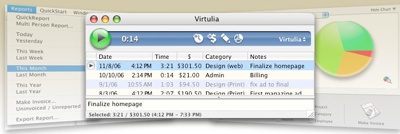
Office Time for the Mac and iOS (http://www.officetime.net/) makes sure none of those valuable dollars and cents slip through your fingers, and more importantly helps you bill that to a third party. It starts off as a general time tracking program.
You can set a series of projects and categories to figure out exactly what you are doing and whom you are doing it for. For example, if you are working on a website project, you might put the website as the project name, coding as the category and then put in notes about exactly what you are coding.
You can even specify what your billable rate is. With this level of detail available, you’ll be able to tell the client exactly how the bill was derived and where their money isgoing.
For professional management, you can use advanced reporting such as graphs and spreadsheets to determine where you time and money are going. In particular I used the program to make detailed reports of exactly how much I spend on different types of projects to know if I should hire additional administrative or technical staff. Office Time also allows exporting for more advanced analysis.
In order to prevent you from missing out on any missed time, Office Time uses a menu bar icon to quickly log a specific project and begin tracking the information. Switching tasks is as easy as choosing from the menu. Should you walk away from the computer or get distracted (dog barking, phone call etc), Office Time will recognize no activity and offer to remove that time from billing or place it in another category (which typically isn’t something you can bill).
Since so many of us are on the road and may not be at our main computer, Office Time also has a separate iOS application that works great on both the iPhone and iPad (full screen on the iPad). The iOS application will sync on demand when both your main computer and iOS device are on the same wireless network. Over-the-air syncing on Wi-Fi or 3G would be great, but I fully understand why these limitations exist.
No stone was left unturned in the design of this program. Since expenses often go along with billed time, Office Time for both Mac OS X and iOS includes expense tracking that can be directly integrated with the projects and categories. You can sync the information with iCal so you can visually see your projects and where your time is going.
Best of all, from right in the program, you can set custom invoicing to send out your bills, or export the data into your favorite accounting program. The program is not for accounting, so it won’t track whether you’ve been paid or if an item is past due, but you can still get your invoices out quickly. International users will appreciate the ability to track in multiple currencies. If you don’t know what an invoice is and you bill your time, this program is a great place to start.
Now, you have absolutely no excuse not to track your time and billables. Except, of course, your own laziness. At least with Office Time, you can’t blame your tools but only your actual productivity. Office Time will save you time and help you bill it better than any program I’ve seen.
Rating: 9 out of 10

