
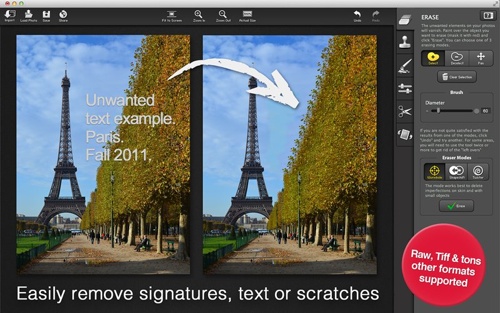
Macphun’s Snapheal, a photo app for Mac OS X (10.6 or later) is now available at the Mac App Store for US$5.99 for a limited time. The regular price will be $14.99 starting March 1. If you want to take advantage of the price reduction, you better act fast.
Snapheal is worth the full price, and is a steal at six bucks. It’s functional, practical and fun. Snapheal performs complex image edits, object cloning, removals and more — and does them quickly. It’s great for: digitally repairing scans of old photos (removing scratches, tear lines, fold lines, etc.) and enhancing new ones. For example, if you have a family beach scene with lots of unknown folks sauntering around in the background, you can simply erase the extraneous people.
Snapheal’s Erasing tool features three different algorithms; each can be used for specific editing needs. “Wormhole” mode is for detail work, such as deleting imperfections on skin and small objects.
“Shapeshift” mode works best for erasing large objects. “Twister” mode is best for images depicting the sky, clouds, lots of small objects and more. In any mode, you can simply “paint” over objects (masking them in red) you wish to erase, then click erase.
If you’re not satisfied with your erasing results, click undo to start over or try another mode. This allows you to experiment with different modes and different brush sizes. For problem areas on some photos, you may need to use the tool twice.
There’s also a Clone&Stamp tool for touch-ups and fixes. This tool lets you paint one part of an image over another part of the same image. It’s great for duplicating objects and removing defects on images. For example, in our example of erasing extraneous folks from a beach scene, you can use the Clone&Stamp to fill in gaps and visual flaws in the images of sand and water caused by the disappearing people.
Snapheal’s Retouch tool lets you enhance a specific part of an image. Choose the tool and paint over the section of the image you want to blur, lighten, darken, sharpen or saturate.
The Macphun software offers 20 different tools, including saturation, gamma, contrast, noise reduction. It also provides the ability to: adjust shadows and highlights; crop and rotate photo; control sharpen; set color temperature; and more.
The results aren’t always perfect. Sometimes even my best efforts couldn’t completely remove unwanted image artifacts. Or if it removed them, it might leave a tiny area that looks manipulated. But, overall, the software did a solid job.
Snapheal handles a variety of file formats, including TIFF and RAW. Plus, it supports a resolution of up to 32 megapixels. You can import images from Aperture and iPhoto albums plus export the creation to iPhoto, share on Facebook, Twitter, Flickr, Tumblr and more.
Finally, the app offers you fun, trivia facts while it’s erasing/touching up your images. For example, did you know that 80% of 10-year-old girls in the US go on a diet?
If you have Photoshop, you don’t need Snapheal. But as most folks probably don’t own Adobe’s high end software, the Macphun provides an affordable, enjoyable way to spruce up your photos and images, both old and new.
Rating: 8 out of 10



![[MD1] CPLAT RADTools / Resource Editor version 2.0](https://www.mactech.com/wp-content/themes/Extra/images/post-format-thumb-text.svg)