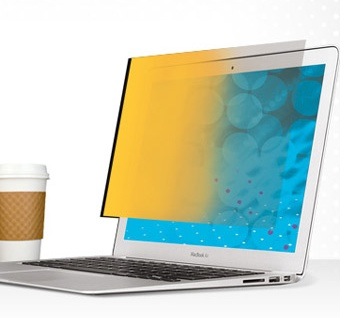
Because of the design of the MacBook Air, MacBook Pro and iMac, these Macs haven’t been able to attach mobile privacy filters to protect on-screen data — until now. 3M — yep, that 3M, the company that specializes in adhesives through their iconic Scotch Tape brand — has served up Mac Confidential privacy filters (http://macte.ch/BzBWB).
The company is offering three designs of privacy filters specifically for these Macs. They use a clear, adhesive strip to attach a privacy filter. They also protect the Mac screen from dust and dirt.
What’s more, the privacy filters fit in well with the Mac design aesthetic. They can also be repositioned hundreds of times, according to the folks at 3M. Of course, this means you’ll have to continually reply the filter, which isn’t easy. But more on that in a moment. Depending on monitor size, the 3M filters range in price from US$33 to $134.
Okay, about that application process (I applied the 3M filter to an 11-inch MacBook Air). Before applying the adhesive, pick which side of the filter you would prefer facing you — the viewing side, in other words. On the black filter, the “matte” side provides an anti-glare viewing surface, and the “glossy” side has greater image clarity. Be sure you apply the strips correctly in order for the filter to be removed easily from your display. And wash your hands before the application (or removal) process. Then:
° Clean the filter and your display using enclosed lint-free cloth.
° Place the filter on table, viewing side down.
° Remove the oval-shaped piece from the liner. Place it over the end of one strip.
Press for two seconds, then peel up strip from the liner.
° Position the filter on your display starting at the bottom. Press along the adhesive to securely attach.
° Position the strip close to edge of filter, centered vertically. Apply the strip to left side of filter by tacking bottom end of strip.
° Apply pressure firmly along length of strip, removing any air bubbles.
° Peel up oval along with the protective cover of strip, leaving the adhesive on.
° Clean the filter and your display using enclosed lint-free cloth.
° Place the filter on the table with the viewing side down.
Repeat these steps to apply a strip to right side of filter.
To remove and/or reposition filter, peel the filter away from display slowly. To protect the filter when not in use, place in the storage folder that 3M provides. If you need new adhesive strips for your 3M Privacy Filter, the company says it will replace them at no charge.
Is the 3M solution worth the time to apply? If you need privacy most of the time and can leave the filter applied, yes. With it, the screen appears blocked-out when viewed from the side. The clarity is also good.
But if you only need privacy on your Mac’s screen part of the time and plan to remove the 3M solution when you’re not using it, the removal/reapply process will get old quickly.
Rating: 7 out of 10
— Dennis Sellers