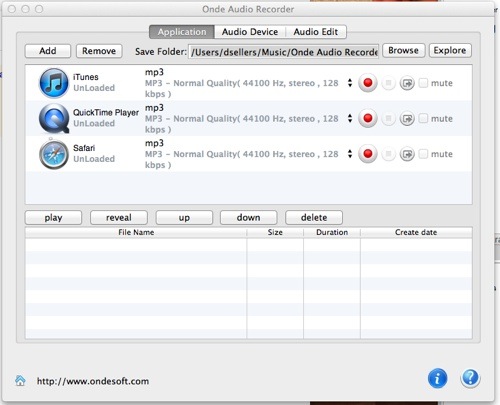
If you need to record audio from just about any source on your Mac, Onde Audio Recorder from OndeSoft (http://www.ondesoft.com) is a good choice despite rudimentary editing features. Whether you need to record a Skype conversation, YouTube audio or more, Onde Audio Recorder’s got you covered.
It can record audio from apps such as Safari, Chrome, Firefox, iTunes, QuickTime, RealPlayer, VLC, and more, as well as grab songs from websites like YouTube, Vimeo, Pandora, LastFM, and others. Onde Audio Recorder also plays nice with with online radio such as Pandora, Lastfm, GrooveShark, and iTunes Radio. In addition, it supports recording audio from IM applications like Facetime, Skype, iChat, Yahoo! Messenger, MSN Messenger, Google talk, Adium, Instantbird, Fire, Proteus AIM, Tencent QQ and much much more.
Not enough? Onde Audio Recorder also can record audio from a microphone, CD player and a line-in devices. Its built-in recording scheduler allows you to set start and end times for recording. Hotkey functionality lets you assign hotkeys that can be used any time to start, pause, and stop recordings.
Recordings can be saved in such audio file formats as MP3, AIFF, AAC, AC3, AU, FLAC, M4A, M4R, MATROSK and OGG. You can record at a range of sampling rates: from 8,000 to 96,000 Hz. Onde Audio Recorder recordings achieve true lossless audio quality, so the audio files you grab sound really good.
Once your recording is finished, you can play your new audio file immediately within the Onde Audio Recorder. Or you can trim the fat from your recordings with the built-in editing function. What’s more, you can cut and splice audio clips into your own unique track and mark several audio segments to combine ’em into one large file.
However, the editing function of Onde Audio Recorder is its biggest flaw. There’s no visual representation of the audio, such as a waveform; this makes editing your audio files a hit ‘n miss process.
Onde Audio Recorder offers a lot of functionality, but it’s easy to use. The interface makes all the tasks easily accessible. For example, to record audio from an app, launch Onde Audio Recorder. Click on the Applications tab, then click on “Add” to add an application.
You’re presented with a variety of options that allow you to set up your recording parameters. You may need to play around with them a bit to see what settings work best for which apps. Also, if you need audio files of special parameters, you can adjust the profile settings — including the codec, bit rate, sample rate and channels — in the Advance panel.
Select the output audio format and save folder, click on the Start or Load button to load the application and play audio or video file that you want to record sound from. Onde Audio Recorder will begin recording the sound automatically. When the recording is done, the app will automatically save lossless recording files into the selected folder.
One nice feature of Onde Audio Recorder is support for batch recording. You can record sound from four applications simultaneously.
If you need a solid, versatile sound recording app, Onde Audio Recorder works well. If you need serious audio editing functions, however, you’ll need to look elsewhere.
Onde Audio Recorder works with Mac OS X 10.6 or higher. It costs US$29.95.
Rating: 7 out of 10