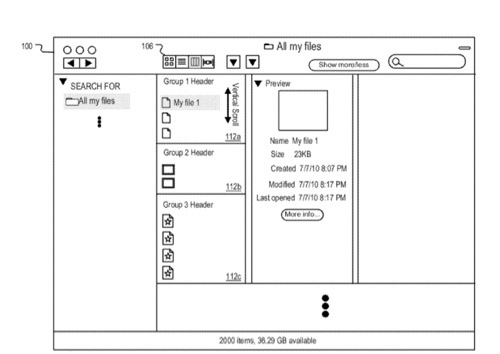
An Apple patent (number 20120185456) for information management with non-hierarchical views has appeared at the U.S. Patent & Trademark Office. Apparently, it involves a modified Finder window in Mac OS X.
Per the patent, information items in a file system are arranged into groups that are created according to a grouping component. A non-hierarchical view displays visual representations (e.g., icons, thumbnail images) of the information items arranged in visually delineated groups according to an arrange type that can be specified for each group.
Various view formats are available including icon, list and column view formats. In each view format, a condensed mode can be selected for one or more groups, resulting in multiple visual representations of items being displayed in a fixed amount of screen space in the non-hierarchical view. In icon view, each condensed group includes a single row of visual representations that can be navigated separately from other groups in the non-hierarchical view.
Here’s Apple’s background and summary of the invention: “Modern computing devices often include a file system that stores information items in various directories or subdirectories (e.g., folders) in a file system hierarchy. Each information item (e.g., a file or a folder) can be given a respective filename. An information item’s filename and its file path in the file system hierarchy can be used to uniquely identify the item in the file system. Each folder can include multiple files and subfolders. Modern computing devices also provide graphical user interfaces (GUIs) or ‘views’ to help the user navigate and manipulate the file system hierarchy and the items stored therein.
“Information items in a file system are arranged in groups that are created according to a grouping component. A non-hierarchical view displays visual representations of the information items arranged in visually delineated groups that can be navigated by a user or application. The visual representations in each visually delineated group can be arranged according to a specified arrange type.
“Various view formats are available including icon, list and column view formats. In each view format, a condensed mode can be selected for one or more groups, resulting in multiple visual representations of items being displayed in a fixed amount of screen space in the non-hierarchical view. In icon view, each condensed group includes a single row of visual representations that can be navigated separately from other groups in the non-hierarchical view. The groups can also be navigated in the non-hierarchical view. In list and column view, each condensed group can be limited to a fixed number of rows for displaying visual representations of items with the group. The maximum number of rows allowed for representing a condensed group in list view can be adaptive, and can expand or contract as the window is resized.
“The grouping component can be specified through an input mechanism (e.g., a pull down menu) or by an application. The grouping component determines the groups that are available in the non-hierarchical view. Depending on the grouping component selected, a non-hierarchical view can include groups based on file type, file size, date, association with an application program, labels or any other attribute. For example, a file type attribute results in the display of separate visually delineated groups displaying visual representations of text documents, audio files, web pages, digital images, videos, etc.
“In some implementations, the non-hierarchical view can be resized. During the resizing, visual representations no longer in the non-hierarchical view due to the view contracting can be stacked on top of overflow icons located on either end of the row of visual representations. Similarly, visual representations that come into the non-hierarchical view due to the view expanding can be laid out in the row one by one. This resizing feature allows a currently selected icon to remain in the non-hierarchical view during and after the resizing.
“In some implementations, file systems including user-oriented information items can be searched by a search engine using a query that includes and excludes file paths so that only user-oriented information items are return in a search result. Search filters can be used remove non user-oriented files. The queries can be initiated by group logic and updated as information items are added, deleted or modified in the file system so that the non-hierarchical view is current.
“Particular implementations of information management using non-hierarchical views provide one or more of the following advantages. Non-hierarchical views displaying visually delineated groups of visual representations corresponding to user-oriented information items provide better visual feedback for user interaction with a computer file system. Such non-hierarchical views also allow more efficient or faster search, retrieval or evaluation of user-oriented information items.
The inventors are David Hart, Laurent Baumann, Patrick Coffmann, Aram David Kudurshian.