
By Pete Collins
I’ve been a huge fan of the Wacom Cintiq 21UX, so when I heard that the new 24HD was coming out, I couldn’t wait to try it. The only downside of the 21UX is that after using it for an extended period of time, my back becomes tight due to the way it sits on the stand.
My remedy is to take it off of the stand and use it in my lap to get into a more natural drawing position, but it’s heavy, hot, and that darn cord running out of the center of it always gets in the way. This new Cintiq promised to take care of that with its great new stand. Plus, it has an even larger, widescreen HD surface to work with at 24.1 inches.
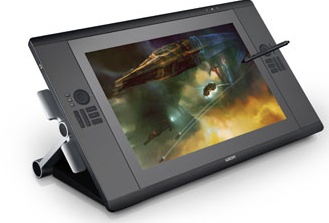
My first impression? It’s big! This thing weighs in at just more than 60 lbs, so you won’t be setting it in your lap, but your desk will look great with this monster sitting on it. The stand and screen flow so well together it simply invites you to work on it. The larger screen and extra workspace around the edges allow you to be really hands-on and not worry about running out of room.
The new stand is a big leap forward, allowing you to tilt the screen over the edge of the desk. This means I can lean over the screen and draw as if I were using a pad of paper or a drafting table. The screen itself can swivel to just about any angle I want and this makes my back much happier. My only caveat is that I wish it had more intermediate positions besides all the way up and all the way down.
The next thing I noticed were lots of buttons. There are plenty of programmable buttons (ExpressKeys), as well as a scroll wheel (Touch Ring) on each side of the screen. Programing the ExpressKeys and Touch Ring for each program takes a bit of time on the front end, but you’ll be rewarded with speed and efficiency. Wacom has even added some productivity-boosting shortcuts that give you a quick view of the pen and tablet settings, a virtual keyboard, and a jump button to the Wacom System Preferences for easy changes on the fly.
There’s a single USB port on the upper-left side of the screen so you can plug in a peripheral, such as a keyboard. I really wish there were at least two ports and they were in the middle or at the bottom, but that’s just me being nitpicky.
Putting it through its paces, the performance was great. Wacom has the market cornered on how to do these tablets right. The 24HD has 2,048 levels of pressure sensitivity and 40° of tilt—that means precise control no matter what I’m drawing or what program I’m using. It really does feel like drawing on a pad of paper, so much so I still find myself trying to brush away crumbs after I use the eraser.
Oftentimes, when I’m drawing on paper, I wish I were using the Cintiq so that I can have access to layers and, most importantly, multiple undos. This beast of a machine is a dream to work with.
Some folks out there may scoff at the US$2,599 price tag; however, I feel the Cintiq 24HD is one of the greatest creative tools that I’ve used and I have no desire to use anything else. When I can’t use the Cintiq, I feel like I’ve been asked to work with my left hand. Nothing feels right and I have to work more slowly and less precisely. I’ve been a huge advocate for folks who are serious about their work looking into the Cintiq as an investment into their time and their craft.
Photographers know the value of quality lenses, and as a person involved in the creative arena, you should strive to use the best tools available to you. The Cintiq 24HD is definitely worth the investment. Learn more at www.wacom.com .
Rating: 10 out of 10
(This review is brought to you courtesy of “Layers Magazine”: http://layersmagazine.com/ .)

