Apple has been granted a patent (number 8307287) for a heads-up display for use in a media manipulation operation. The invention relates to media manipulation operations and, more specifically, to operations that manipulate media items relative to a timeline with which one or more other media items are associated.
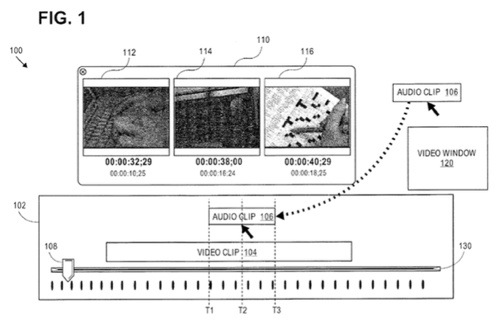
According to one embodiment, a transient heads-up-display is displayed during a media manipulation operation to assist the user in the media manipulation operation. The heads-up-display may, for example, depict three frames of a video clip when an audio clip is being positioned, on a timeline, relative to the video clip. The three frames that are depicted in the heads-up-display may be the frames located at the current starting position, cursor position, and ending position, of the audio clip. As the audio clip is being moved during the positioning operation, the three frames depicted in the heads-up-display change accordingly.
Here’s Apple’s background on the invention: “Many software applications exist that allow users to perform operations on media items, such as video clips and sound clips. Those applications often generate a user interface display that includes a timeline, and provide tools that allow users to position media items along the timeline.
“For example, a user may add a video clip to a timeline, where the start of the video clip corresponds to time T1 and the end of the video clip corresponds to time T500. Once the video clip has been placed on the timeline, a user may wish to place an audio clip along the same timeline. In many cases, the quality of the final product being created by the user may hinge on the accuracy of the placement of the audio.
“To assist the user in selecting where to place the audio clip, the software application may include, within the layout of the timeline display screen, a video window and a playhead control. The video window displays a video frame of the video clip. The specific video frame that is displayed is determined by the position of the playhead control. Typically, the software application would allow the user to move the playhead control along the displayed timeline. As the playhead control is moved along the timeline, the video window displays the video frame of the video clip that corresponds to the current position of the playhead control.
“By watching the video window while moving the playhead control, a user may identify a video frame at which the audio clip should start. The user may then place the start of the audio clip at the position of the playhead control in the timeline, to ensure that the audio clip will start playing at the frame currently displayed in the video window.
“If it is important for an audio clip to end at a particular frame in the video, then the user may find the appropriate frame by moving the playhead control while watching the video window, and then position the audio clip on the timeline so that the audio clip ends at the current position of the playhead control.
“Unfortunately, the process of first positioning the playhead, and then positioning a media clip based on the playhead, is cumbersome. Consequently, some software applications include a feature that allows users to place media items, based on the video window, without first positioning the playhead.
“Specifically, while a user is positioning an audio clip on a timeline, some applications cause the video window to display the video frame that corresponds to the current position of the start of the audio clip, regardless of the current position of the playhead. By watching the video window while moving the audio clip along the timeline, the user can pick the exact video frame for the start of the audio.
“Unfortunately, causing the video window to display the video frame that corresponds to the start of the audio clip may not provide sufficient information to the user. For example, a user that is concerned about the video frame that corresponds to the end of the audio clip will not be helped by seeing the video frame that corresponds to the start of the audio clip. Further, it is rather cumbersome to be placing a video clip along a timeline on one part of the display, while trying to watch the video frames that are being shown in another part of the display.
“The correct placement of media clips along a timeline is made even more difficult by the fact that the video windows in timeline interfaces are often very small (to allow more room for the other aspects of the timeline interface), and may be visually distant from the timeline on which the media clip is being placed. To increase the size of the video window, users often display the video window on one screen, and the other components of the timeline interface on another screen.
The approaches described in this section are approaches that could be pursued, but not necessarily approaches that have been previously conceived or pursued. Therefore, unless otherwise indicated, it should not be assumed that any of the approaches described in this section qualify as prior art merely by virtue of their inclusion in this section.”
Nikhil M. Bhatt is the inventor.