
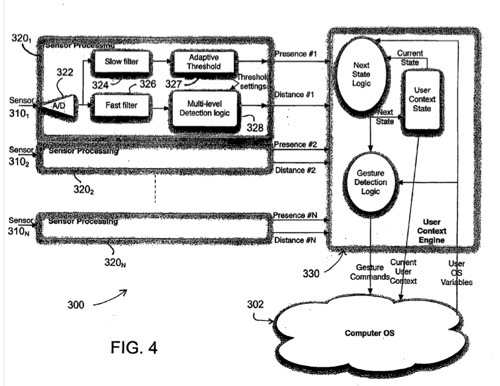
Apple patent is for An Apple patent (number 2010083188) has appeared at the US Patent & Trademark Office for a sensor-based computer user interface and system. Per the patent, systems and methods may provide user control of a computer system via one or more sensors.
Also, systems and methods may provide automated response of a computer system to information acquired via one or more sensors. The sensor(s) may be configured to measure distance, depth proximity and/or presence. In particular, the sensor(s) may be configured to measure a relative location, distance, presence, movements and/or gestures of one or more users of the computer system. Thus, the systems and methods may provide a computer user interface based on measurements of distance, depth, proximity, presence and/or movements by one or more sensors.
For example, various contexts and/or operations of the computer system, at the operating system level and/or the application level, may be controlled, automatically and/or at a user’s direction, based on information acquired by the sensor(s). The inventors are Aleksandar Pance, David Robbins Falkenburg and Jason Medeiros.
Here’s Apple’s background and summary of the invention: “A wide variety of computer devices are known, including, but not limited to, personal computers, laptop computers, personal digital assistants (PDAs), and the like. Such computer devices are typically configured with a user interface that allows a user to input information, such as commands, data, control signals, and the like, via user interface devices, such as a keyboard, a mouse, a trackball, a stylus, a touch screen, and the like.
“Other devices, such as kiosks, automated teller machines (ATMs), and the like, may include a processor or otherwise be interfaced with a processor. Accordingly, such devices may essentially include a computer and thus may include a similar user interface as employed for computer systems.
“Various embodiments described herein are directed to computer user interface systems and methods that provide user input to a computer based on data obtained from at least one distance, depth and/or proximity sensor associated with the computer. In particular, various embodiments involve a plurality of distance, depth and/or proximity sensors associated with the computer.
“Various embodiments contemplate a computer user interface systems that allow a computer to be controlled or otherwise alter its operation based on information detected by such sensors. In some embodiment, an operating system of the computer may be controlled based on such information. Alternatively or additionally, an active application may be controlled based on such information.
“In particular, the information detected by such sensors may define various user contexts. In other words, the sensor(s) may detect a user parameter relative to the computer such that different user contexts may be determined. For example, a user presence context may be determined to be presence of a user, absence of a user or presence of multiple users within a vicinity of the computer. Based on the determined user presence context, the computer may be placed in a particular mode of operation and/or may alter an appearance of information displayed by the computer.
“Various other user contexts may be determined based on information or user parameters detected by one or more sensors. A user proximity context may be determined, for example, in terms of a location of a user relative to the computer or a distance of a user from the computer. In such embodiments, an appearance of information displayed by the computer may be altered or otherwise controlled based on the user proximity context. For example, a size and/or a content of the information displayed by the computer may be altered or controlled.
“Also, in some embodiments, a user gesture context may be determined based on information or user parameters detected by one or more sensors. In such embodiments, one or more operations of the computer may be performed based on the determined user gesture context. For example, such operations may include, but are not limited to, scrolling, selecting, zooming, or the like. In various embodiments, such operations may be applied to an active application of the computer. In general, user gesture contexts may be employed to allow a user to operate the computer remotely via the one or more sensors, without a remote controller or other auxiliary user manipulated input device.
“Thus, various embodiments contemplate a sensor-based computer user interface system. Other embodiments contemplate a method user interaction with a computer system via one or more sensors. Still further embodiments contemplate a computer readable storage medium including stored instructions that, when executed by a computer, cause the computer to perform any of the various methods described herein and/or any of the functions of the systems disclosed herein.”

