Freshly Squeezed Reviews: truly the digital video shoebox
TweetFollow Us on Twitter

Freshly Squeezed Reviews: truly the digital video shoebox


Whether your a backyard Spielberg or a professional videographer, you inevitably accumulate a ton of footage to keep track of, be it for a single project or archiving. You could create several folders and, if you are archiving, .Zip them. But you're working on a computer! Shouldn't it be doing the work Instead of you?

"Create and organize your video catalogue. iDive offers videographers, both professionals and amateur enthusiasts, the possibility of managing video footage collections. iDive transforms your videos into a catalog that's easy and quick to put together and access."

Does the application live up to its promise in a true production workflow?

The Juice

With iDive 2 from Aquafadas (http://www.aquafadas.com), you first capture your digital footage and organize it by date and/or event. Just hook your camera to your Mac, launch the US$79 app click a few times and your importing your footage. 

Once captured, your footage is then logged. You can even catalogue your CDs and DVDs, not just memories from your camcorder tapes. You can even organize clips that you download from the intent, from sites such as You Tube. Think of it as a video iPhoto, in that sense.

As for cataloging, iDive works in many formats from the ubiquitous QuickTime to MPEG2 and AVCHD (it is also linked to Aquafadas' VideoPier, to read other formats). You can navigate your libraries in either list or thumbnail mode. You can also set it to import your footage and separate it by scenes. This takes longer to perform but could save you a ton of time in post.

As for exporting, you can export your chosen footage to any Quicktime format from iPhone/iPod touch to Apple TV. You can save the thumbnails from throughout your clips as images. You can export directly to iMovie, Final Cut Express, Final Cut Pro, Avid and iPhoto.

The Pulp

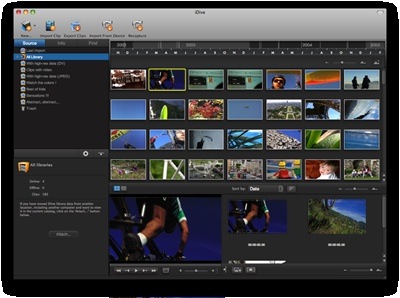
iDive 2 sports a new GUI which I found easy to use on the small real estate of my 13" MacBook Pro. I was able to access any library, view all relevant clip information , such as apsect ratio, clip duration, etc. Plus, there's even a small screen at the bottom of the pane to watch my clip. And, if I wish, I can switch it to full screen mode.

At first, I felt a little daunted when I launched the program. But their support is so thorough that I was able to answer my initial question in no time with their extensive .PDF file. After that, the interface led you through the steps effortlessly.

The Rind

Nada.

Summary

If you're going to be juggling any amount of footage, then you most definitely need to get iDive. And if you do any video work for a living or income, then Aquafadas' iDive will pay for itself within your first production. You don't have to waste your time (i.e.., money) cataloguing your libraries or, more expensive yet, paying someone to do it for you.

I have used several Aquafadas products (particularly Pulp and Advanced Pulp) and can't say enough about their quality or attention to detail. Even to the point that the creators man the forums. Can't ask for better support than that.

You know the more video applications advance, I can't help but feel that we have now officially surpassed the workflow of Max Headroom.

Rating: 10 of 10

-- Frank Petrie

 
AAPL
$439.88
Apple Inc.
-3.05
GOOG
$903.96
Google Inc.
-4.57
MSFT
$34.89
Microsoft Corpora
-0.19
MacNews Search:
Community Search:
view counter

view counter
view counter
view counter
dockXtender
view counter
view counter
view counter
view counter
view counter

Khan Academy Review
Khan Academy Review By David Rabinowitz on May 21st, 2013 Our Rating: :: LEARN ANYTHINGUniversal App - Designed for iPhone and iPad Khan Academy is a popular and free online collection of education videos. The app is a quick and easy way to watch any of its thousands of videos.   | Read more »
Street Fighter IV Is Part Of Capcom’s Su...
Street Fighter IV Is Part Of Capcom’s Summer Kickoff Sale, Now Only $0.99 Cents Posted by Andrew Stevens on May 21st, 2013 [ permalink ] | Read more »
PhotoNova+ 2 Review
PhotoNova+ 2 Review By Angela LaFollette on May 21st, 2013 Our Rating: :: ALMOST PICTURE PERFECTiPhone App - Designed for the iPhone, compatible with the iPad A free powerful photo editing app that offers plenty of impressive tools to help users create beautiful photographs.   | Read more »
Slice Can Track Your Shipments On A Sing...
Slice Can Track Your Shipments On A Single Map Posted by Andrew Stevens on May 21st, 2013 [ permalink ] iPhone App - Designed for the iPhone, compatible with the iPad | Read more »
Caveman Golf Review
Caveman Golf Review By Jennifer Allen on May 21st, 2013 Our Rating: :: BOGEYiPhone App - Designed for the iPhone, compatible with the iPad Flawed and a little rough and ready, Caveman Golf still has enough going for it to intrigue.   | Read more »
Tomb Breaker Review
Tomb Breaker Review By Jennifer Allen on May 20th, 2013 Our Rating: :: SIMPLE MATCHINGUniversal App - Designed for iPhone and iPad Tomb Breaker keeps it simple with gameplay just a matter of matching up gems and nothing more. It’s fun for a time, but pretty forgettable.   | Read more »
Jacob Jones And The Bigfoot Mystery Revi...
Jacob Jones And The Bigfoot Mystery Review By Jennifer Allen on May 20th, 2013 Our Rating: Universal App - Designed for iPhone and iPad Charming and cute, Jacob Jones and the Bigfoot Mystery also offers some fun puzzles and mysteries to solve.   | Read more »
Equilibrium Review
Equilibrium Review By David Rabinowitz on May 20th, 2013 Our Rating: :: PARTICLE PHYSICSiPhone App - Designed for the iPhone, compatible with the iPad Equilibrium is a physics-based puzzler with a unique and innovative story element.   | Read more »
Gravity Guy 2 Review
Gravity Guy 2 Review By Jennifer Allen on May 20th, 2013 Our Rating: :: STEADY RUNNINGUniversal App - Designed for iPhone and iPad With not much in common with its predecessor, Gravity Guy 2 is a fairly run of the mill Endless Runner.   | Read more »
How To: Enable a Passcode to Protect You...
Think about all the important information and communication methods that you have available on your phone. Now think that it’s probably all unprotected if someone nabs your phone. Thankfully, it’s possible to set a passcode lock in order to help protect your device. Here’s how to do it and to keep it from being too much of a hassle to use your... | Read more »
All contents are Copyright 1984-2010 by Xplain Corporation. All rights reserved. Theme designed by Icreon.