Be proactive and give your Apple products 'Macsimum Security.'
To set an example, let's start with buying an iPhone. The first thing you want to do is write down the iPhone's serial and IMEI numbers, and keep those together with your sales receipt. You will need this information to give to law enforcement and AT&T if the iPhone is ever lost or stolen. The same goes for any other Apple products. Keep the sales receipts and serial numbers in a safe place.
Next, you want to consider buying insurance to cover theft and accidental danage. Below are some options:
1. Contact your auto, renters' or homeowners' insurance agent. Often riders can be added for around $25.00 a year on an existing policy.
2. Consider buying the iPhone and other products with a credit card. They often include credit card purchase protection.
American Express Gold Rewards Card generally includes the following protections:
• Purchase Protection Plan: The Purchase Protection Plan will repair or replace illegible items, or reimburse the amount you charged to the Card for covered items, up to $1000 per Occurrence, if they are stolen or accidentally damaged up to 90 days from the date of purchase.
• Buyer’s Assurance Plan: The Buyer’s Assurance Plan extends the terms of the original manufacturer’s warranty on covered items, up to one additional year on warranties of five years or less that are eligible in the U.S., when the entire amount was charged to your Card.
With Visa’s purchase security, “virtually everything†you purchase with your covered Visa card is protected in case of theft or damage for the first 90 days from the date of purchase. The plan allows you to replace or repair your purchases, get reimbursed for eligible items, and file claims online. Note that there is a $500 per claim maximum. MasterCard also offers a similar 90-day program.
Most credit card companies also include extension of the standard manufacturer’s warranty. Contact your issuer for details, and be sure to explicitly ask for coverage of the iPhone based on price and other details.
What about AppleCare, you ask? Well, unfortunately AppleCare does not cover theft or accidental damage. You may want to give Apple some feedback to add that to AppleCare.
3. You can purchase an insurance policy here for $100.00 a year with a $100.00 deductible.
4. If you live in the United Kingdom, you can buy an iPhone insurance plan here for £5.88 a month.
'Macsimum Security' tips.
1. Turn on the iPhone's passcode feature. The thief will not be able to get inside the iPhone without the passcode.
2. Don't store any sensitive information on your iPhone. According to law enforcement, thieves don't steal them to use them. They're looking for account passwords, charge card information and online banking info. NEVER set auto fill, or embed your ID, passwords or account numbers. Always key those in on the fly when accessing sensitive data. Better yet, DO NOT USE your iPhone for those purposes! With WiFi packet sniffers, lurking crooks can grab your transactions on-the-fly. Read "Securing your iPhone's traffic."
3. StuffBak is a service that makes it easy for you to confidentially link important mobile assets to an international 24/7/365 recovery network. When a StuffBak-labeled item is found, the registered owner is immediately contacted by phone and email. StuffBak facilitates a speedy recovery and always thanks the finder.
4. Do not set your Apple laptop to automatically login to your account at startup. Use a password.
5. Install theft deterrent software on laptops. Below are a few to consider.
• iAlertU
• Undercover
• LoJack for Laptops
• Bak2U
• Unlose.it / Stolen iPod
• GadgetTrak
• MultiAlarm
• Mac PhoneHome
• Turn your MacBook's iSight into a FTP backed up security camera
Steps to recover lost or stolen Apple products.
As of now, Apple offers little help in helping you recover lost or stolen products. Apple states in this Knowledge Base document, "Apple does not have a formal flagging process for reporting stolen property. If you have lost or found an Apple product, please contact your local law enforcement agency to report it."
So if your iPhone or Apple product is stolen, try these tips to recover it:
1. Contact your local law enforcement agency and report it stolen. You will need the sales receipt, serial number, and in the case of a lost or stolen iPhone, the IMEI number I referred to earlier. Keep all records of the police report and any follow-up information. You can claim it on your income taxes as stolen property.
2. With a lost or stolen iPhone, call AT&T's Fraud Department (1-877-844-5584) right away and report it. Give them a copy of the police report and request that they inform you when your iPhone is trying to be activated by someone else. They may be able to track any activity through iTunes.
3. Report your iPhone or Apple product to these stolen equipment databases. You can even search some of the databases for your product.
• PowerMax Stolen Equipment Search
• PowerMax Stolen Equipment Report
• Stolen 911 (video)
• JustStolen.net
• just-stolen.com
• The Stolen iPod
4. Macsimum News reader Jason suggests, "Remember that one of the first things to do is contact your ISP and ASP (if applicable). Because most service providers have recent logs, they can track where a machine tries to login, and that gives you power when trying to track down and recover a given device. Also, do not be afraid to contact the local service providers, as many will keep lists of machine’s serial numbers that have been stolen."
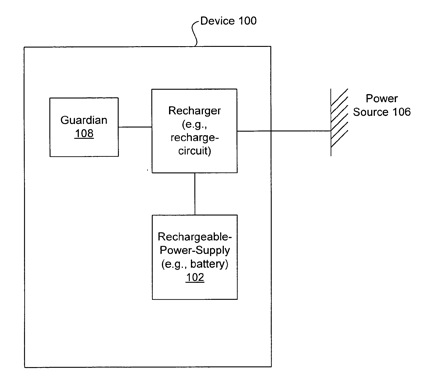
Unfortunately, the odds of recovering a stolen Apple product are slim, but Apple is working to change that. They have applied for a 'Protecting electronic devices from extended unauthorized use' patent. You can hear all about it in the Dateline NBC video below.
Patent Drawing
Dateline NBC 'To Catch an i-Jacker' Video

Part 1: iPod leaves digital breadcrumbs (5:14)
Part 2: Unattended iPods keep disappearing (9:51)
Part 3: Kid takes iPod – and it gets stolen (7:28)
Part 4: Teen credits stolen iPod to cruel world (7:38)
Part 5: How much does Apple care? (6:15)
Part 6: Apple applies for theft deterrent patent (4:17)
(You can also view this video on an iPhone or iPod. Just control-click on the links, save them to your hard drive, drag them to your iTunes library and sync them to your iPhone or iPod.)
Video courtesy of Dateline NBC
 "Macsimum News" is a proud supporter of [url=http://planetgumbo.org/]Planet Gumbo[/url], which feeds the hungry. We urge you to help them in their efforts.










