How to watch HD from a cable or satellite receiver on your Mac
TweetFollow Us on Twitter

How to watch HD from a cable or satellite receiver on your Mac


It's long perturbed me that I can't watch HD from a cable or satellite receiver on my Mac. Well, actually I (and you) can, though it's a bit of a kludge to make it happen. But, doggone it, I have a 27-inch iMac, and I was determined to find a solution.

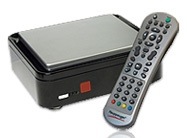
If, like me, that's a goal of yours, here's how to to do it. My hardware/software brand of choice for viewing TV on my Mac is EyeTV from Elgato (http://www.elgato.com). Unfortunately, no EyeTV device can receive HD from a cable or satellite receiver. The only device that can do this is the third-party Hauppauge HD PVR (http://www.hauppauge.com/site/products/data_hdpvr.html). The unit comes with Windows software, but can also be used on the Mac (Intel systems only; PowerPC Macs need not apply) with EyeTV 3.1 or later.

The HD PVR captures video in the H.264 video format, using SD and HD resolutions. Audio can be AAC or AC3 (Dolby), depending on the source. That's good. But there are lots of gotchas to using it on the Mac.

The HD PVR doesn't have a tuner input for antenna or cable. The infrared remote receiver isn't supported, and the infrared remote blaster can't legally be supported on the Mac. The minimum firmware supported is 1.15, and the HD PVR must be "flashed" on a Windows machine using Hauppauge’s driver software before you can use it with EyeTV on your Mac.

In other words, you have to hook up the HD PVR to a PC and install the drivers before you can use it with a Mac. If you don't have a PC, you can use Boot Camp, install Windows and do it with your Mac. Or, better yet, get a friend with a PC to "flash" the Hauppauge device for you if, like me, you don't really want Windows on your Mac.

Once you've done all this, you can indeed receive HD from a cable or satellite receiver. As for me, I can now watch my Comcast line-up on my iMac. However, I'm unable to change the channel from the EyeTV channel menu. I can only change it by using the Comcast remote control.

That's normal, and the HD PVR is working normally because the video connections to the HD PVR are only one-way -- outgoing from the cable box. There's literally no way for your Mac to make itself "heard" by the set-top box.

A third party product can simulate the remote signal and allow you to change channels on your cable box directly from the EyeTV 3 software, as described here.

This set-up isn't the smooth solution I'd prefer, but it works (though I hear that Elgato may be working on a solution). My Mac is now my personal computer, stereo, DVD player and sometimes-TV. Now to move onto a Blu-ray workaround...

-- Dennis Sellers

 
AAPL
$493.53
Apple Inc.
+0.36
GOOG
$605.06
Google Inc.
-6.40
MSFT
$30.53
Microsoft Corpora
-0.24
MacNews Search:
Community Search:

Five For Friday: Week of February 10
Another week of the year down and so we look back at five of the best apps and games of the past seven days. This time round, we have a healthy dose of education and knowledge, alongside a new way to create animations and some fun with droids. | Read more »
Protoxide: Death Race Review
Protoxide: Death Race Review By Dan Lee on February 10th, 2012 Our Rating: :: APOCALYPTICUniversal App - Designed for iPhone and iPad Battle and race futuristic craft in an alternate world   | Read more »
36 Million Temple Run Players Can’t Be W...
In a tweet this morning, Natalia Luckyanova, co-founder of Imangi Studios, the developers behind runaway hit Temple Run, let it be known that their game has hit 36 million downloads. Let’s pause for effect here. 36 million iOS devices (they’re working on getting to the Android platform furiously as we go to press) have this hot game downloaded to... | Read more »
AT&T Introduces U-verse for iPad wit...
U-verse has released an app for subscribers to their TV and high-speed internet service that brings both control of their receiver, along with access to on demand video. By downloading AT&T U-verse for iPad and logging in to the user’s AT&T U-verse account, the app’s functions become available. | Read more »
Jigsaw Mansion 2 Review
Jigsaw Mansion 2 Review By Rob Rich on February 10th, 2012 Our Rating: :: TOO EASYiPhone App - Designed for the iPhone, compatible with the iPad Jigsaw Mansion 2 is bound to make plenty of puzzle fans (as in puzzle-puzzles) happy, so long as they don’t mind having their hand held all the time.   | Read more »
FREEday 2/10/2012 – “None of us are FREE...
Shooting and strategy seem to be the two key themes in this weeks FREEday. I honestly didn’t plan it that way, it just sort of happened. Although I suppose it’s not that bad. They are two incredibly popular kinds of games for iOS devices these days. Then again, just about anything that lends itself to quick bursts of playtime do quite well for... | Read more »
Doodlecast Pro Review
Doodlecast Pro Review By Lisa Caplan on February 10th, 2012 Our Rating: :: SIMPLE BRILLIANCEiPad Only App - Designed for the iPad A simple recording tool with endless possibilities.   Developer: Zinc Roe Price: $3.99 Version: 1.1 App Reviewed on: iPad 2 | Read more »
Chillingo Introduces Two New Games: Digg...
Chillingo keeps digging through the App Store, with new games frequently bubbling up, and this week, their games are about both digging and bubbles! | Read more »
Caylus Review
Caylus Review By Rob Rich on February 10th, 2012 Our Rating: :: NO SIMPLE TASKUniversal App - Designed for iPhone and iPad Caylus has all the trappings of a deep iOS board game, assuming complexity isn’t a problem.   | Read more »
Decide Where To Eat With Hngry
On Twitter, it’s a dilemma that would be referred to as a ‘first world problem’ but it is sometimes difficult to decide which restaurant to go to for a meal. So many choices are out there and when it’s a decision that has to be made between many friends, things can get tricky. Enter Hngry, an app that may lack an ‘u’ but certainly doesn’t lack... | Read more »
All contents are Copyright 1984-2010 by Xplain Corporation. All rights reserved. Theme designed by Icreon.