
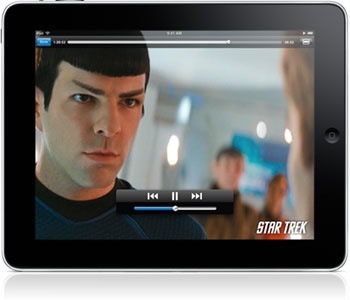
My iPad — the US$699, 64GB Wi-Fi-only version — is a great Mac companion, as I mentioned yesterday. It’s already replaced my iPod touch and may replace my laptop (though the jury’s still out on that). I’ve been using it heavily since it arrived Saturday, and, so far, I’m more impressed than I thought I’d be, though there’s room for improvement.
Well, probably not in the design of the iPad itself. As you’d expect, it’s another exquisite piece of work from Apple. The 9.7-inch screen with its 1024 x 768 pixel resolution is gorgeous. As is the minimalist design.
Jobs & Company can’t quite eliminate buttons, though I think they’d love to. On the iPad, there’s a home button on the screen, a sleep/power button and volume adjuster at the top right, and a switch that locks the iPad into either horizontal or portrait view. Built-in speakers are on the bottom of the iPad and provide more oomph than you’d think, though they’ll not replace dedicated speakers or a good pair of headphones by any stretch of the imagination.
The battery is, of course, built-in. Apple claims it offers 10 hours of life on a single charge. I found that to be conservative even when playing games, watching videos or surfing the web. My iPad ran about 11 hours on a charge.
As many folks have pointed out, the iPad resembles an iPod touch on steroids, but it’s much more. At 1.5 pounds, it’s lighter and thinner than any netbook I’ve seen, which makes it a wonderful travel companion (whether that travel is a road trip or venturing from room to room in your house). However, you should note that the screen is incredibly glossy, almost mirror-like in the sunlight. Also, it shows EVERY fingerprint — and remember this is a multi-touch device. So if you have a fingerprint phobia, be prepared to: a) go crazy, b) do a lot of screen cleaning, or c) get a screen protector.
Setting up an iPad is a no-brainer; you don’t need the rudimentary instructions that come with the device. Plug it into a Mac or PC running iTunes. Once it’s detected, a registration function kicks in and sets it up. Then you can sync various media (music, movies, contacts, calendars). Any apps you’ve downloaded onto your computer — including ones you’ve bought for an iPhone or iPod touch — transfer over automatically, unless you specify otherwise. I’d recommend manual syncing if you have lots of albums, video files and digital movies, like I do. Personally, I prefer to carry all my music with me on the iPad; however, I only sync up whatever homemade videos and/or movies that I think I’ll watch soon. I do this to save space.
If you have LOTS of media, the syncing process can take a while via the USB connector. So don’t plan to sync your iPod and Mac in a couple of minutes the first time you do sync ’em. Subsequent syncs are much faster.
In this, the first part of my four-part review, I’ll look at the iPad as a music, video device and gaming device. If you love the iPod touch for playing your tunes, you’ll love the iPad. It’s pretty much the same.
If you have an online connection, you can buy music and buy or rent movies wirelessly. You can browse your music by new releases, top ten lists, genres, albums, artists and more. And the CoverFlow view looks gorgeous on the iPad’s big screen.
There is one thing I found confusing about the way the iPad handles music. After I first synced it with my Mac, I pressed the iTunes icon to access my music. Wrong. That carries you to the iTunes Store. To play music, you press the iPod icon. Yes, your iPad has an iPod icon on it.
When you connect the iPad to your Mac or PC, the music, movies, TV shows, and videos from iTunes on your computer can sync to your iPad — and the media on your iPad can sync to iTunes on your computer. I think movies deserve a big screen whenever, and there are some compromises in movie viewing on the iPad.
The Apple device’s 1024 x 768 pixel screen is in a 4:3 ratio, while the latest TVs boast a 16 x 9 aspect ratio. Playing a 16 x 9 movie on the iPad (as I did with “Up” and “The Taking of Pelham 123”) puts black bars at the top and bottom of your screen. And, of course, with 1024 x 768 pixels you’re not going to get 1080i Hi-Def.
That’s one of the compromises Apple had to make in order to make the iPad the multi-purpose device it is. That said, the movies I watched on the device looked better, even with letter-boxing, than I’d expected.
But if the iPad is a good-but-not-great movie viewer, it is a great gaming system. I ordered Super Monkeyball and Real Racing HD for my device. Graphics-intensive games such as the latter look vibrant on the screen and play fluidly.
Most older iPhone/iPod touch games work pretty well on the iPad. You can play ’em at their intended size (a smaller screen surrounded by a black background) or double their size. The doubled pixel games looked, as you might guess, pixelated, so I’d recommend keeping ’em at the smaller size — though the small screen and bigger body of the iPad make a somewhat awkward pair. But there are dozens of games built or updated daily for the iPad. Look for games with an HD or XL designation in the Apple App Store.
Some have complained that the iPad is hard to use for games because it’s too heavy at 1.5 pounds. Neither my son nor I found this to be a problem. But perhaps we’re just exceptionally buff!
Tomorrow: Safari, Mail, Calendar and Contacts on the iPad

