
In this, the third part of our four-part review, we’ll look at the iPad as a photo viewing and ebook device, as well as device for reading digital newspapers. The synopsis: it’s good for all these purposes — and excellent at two of ’em.
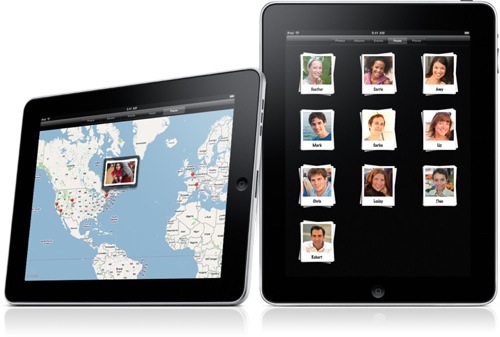
Photos for iPad syncs with iPhoto on a Mac (at least up to a point) and transfers your pics onto the new Apple device. Your photo albums appear as little stacks you can pinch to preview. Tap a stack, and the whole album opens up. From there you can scroll through thumbnails. Tap to view full screen or flip through photos one at a time.
Photos can be viewed in either landscape or portrait mode — and they look great in either. The iPad’s IPS (in-plane switching) technology offers a wide viewing angle so you can easily show off your pics to others.
Photos for iPad integrates with Faces and Places in iPhoto for the Mac, so you can view your photos not only by date and event but also by who’s in them and where they were taken. You can create and play own slideshows, to which you can add music and animated transitions. And you can share photos with others via email or by publishing them online using MobileMe.
In addition to syncing with your Mac (or, if you must, a PC), you’ll soon be able to upload photos directly to the iPad when Apple ships its Camera Connection Kit, which will gives you two ways to import photos and videos from a digital camera. It lets you import your photos and videos to the iPad using the camera’s USB cable. Or you can use the SD Card Reader to import photos and videos directly from the camera’s SD card.
The downside of Photos on iPad: if you have a huge number of albums and events as I do, it’s hard to find items quickly. I prefer the way the Mac lets you create nested hierarchies of albums, and I can’t see any reason why the iPad software couldn’t do the same.
When it comes to ebooks, the iPad’s free iBookstore app is very cool. It features books from major and independent publishers. The free iBooks app lets you buy books from the iBookstore. Once you’ve bought a book, it’s displayed on your Bookshelf. Just tap it to start reading.
And reading feels natural. You can read in landscape or portrait mode. You can turn pages by dragging from left to right, using a slider at the bottom of the page, or — my favorite — by “flipping” a page as you would a physical book. Or you can go to a table of contents and tap a chapter to navigate there. You can mark where you’ve stopped reading by using the bookmark feature.
And the iPad lets you do things you can’t do with a physical book. You can view a single page or view two pages at once by rotating to landscape. You can change the text size and font. You can look up a word in the iPad’s built-in dictionary or Wikipedia. You can adjust the screen brightness. Also, the iBooks app works with VoiceOver, the screen reader in iPad, so it can read you the contents of any page.
When I got the iPad, I was concerned that reading on a screen would be uncomfortable after a long period of time. I’ve read for an hour or more in one sitting, however, and so far, no problems.
That said, I’m probably not going to give up “real” books any time soon. I like the tactile feel of them, even the “paper-y” smell.
However, I — and probably you — will find it difficult not to download dozens of books from the Gutenberg Project catalog — for free. It It already includes over 30,000 free eBooks from the public domain, and is easily accessible from iBooks. Also, it’s great that iBooks uses ePub, an open book format. If you have books in this format, you can sync ’em to the iPad by importing them into iTunes.
If I’m not ready to give up books just yet, I’d be happy to give up paper versions of newspapers for digital versions. I love what I’ve seen so far. For example, the “USA Today” app for the iPad is fantastic. It’s got a great layout and is customizable. Done right, digital newspapers can blend the best of print layout with web interactivity. And I think they could be one of the biggest selling points for the iPad.
Okay, tomorrow we answer the big questions: is the iPad a good productivity tool and can it replace my MacBook?
— Dennis Sellers


