Turbo.264 HD is especially targeted to anyone who owns an HD camcorder -- which would be me. It automatically detects AVCHD camcorders and moves recordings to the Mac or iPod in one step. Turbo.264 HD comes with a software application that enables Mac users to convert just about any popular video format to a H.264 file in standard or HD resolutions. The encoder hardware is lightning fast, at least in video terms -- and speeds up the export function of other Mac applications such as iMovie.
(H.264 video is a universal format that can be played on iPod, iPhone, Apple TV, gaming consoles, selected smartphones, and on the web. Turbo.264 HD supports many third-party Mac video applications as well as Elgato's EyeTV.)
It was also invaluable in helping me get basketball footage from my AVCHD camcorder into iMovie '09. For one thing, it really speeds up AVCHD footage using iMovie and Final Cut. For another, iMovie didn't "like" some AVCHD video I shot and wouldn't accept it until I ran it through the Elgato device.
The Turbo.264 HD plugs into an USB port on your Mac or a powered USB hub. It sports a red LED at one end that lights up when it's being used. And a dial on the top right of the Turbo.264 software displays red on startup and turns to black (with the max dial) when the Elgato device is connected to a USB port.
To convert a video, drag it into the "Drag video files here" window, choose the format you want the video to use and click the start button. Connect an AVCHD camcorder to your Mac and an Add Camcorder button.
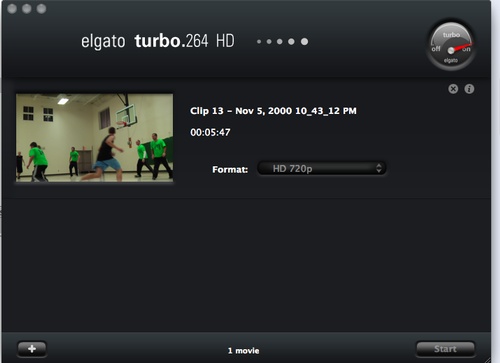
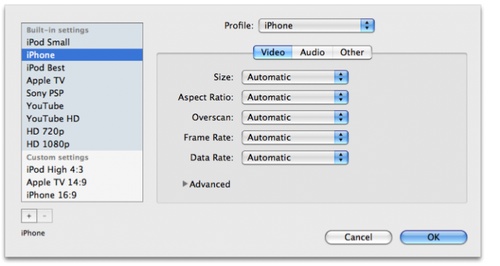
You can drag and drop any video file into the application and convert it to a H.264 file in standard or HD resolutions. Double click on a video clip to watch a preview. You can preview and trim recordings, combine them into one movie and move them directly to the Mac or a YouTube account. You have a choice of nine export presets, ranging from “iPod small†to “HD 1080p." These can be expanded by creating custom video output profiles -- though you can't adjust the pre-sets until you add a video to the to-encode list. Note that if Turbo.264 HD is encoding files, then no more files can be added unit the encode is complete. Also, there are a number of custom settings for audio.
Turbo.264 HD supports AVCHD Video, QuickTime, AVI, DV, WMV, MPEG-1, MPEG-2 Program/Transport Stream, MPEG-4, MP4, M4V, H.263, H.264 AVC, Xvid, VIDEO_TS and more. Turbo.264 HD installs a QuickTime Component that enables it to accelerate H.264 exports other Mac applications.
The Turbo.264 HD requires a Mac with an Intel Core processor, Mac OS X 10.5.6 Leopard (or later) and QuickTime 7.6 (or later).

Using my 24-inch, 3.06GHz iMac, I moved over 40 minutes of footage on my Panasonic AVCHD camcorder onto my Mac's hard drive in 1080p format in just over 30 minutes.
There is a feature I'd love to see added in future versions of the 's software. Currently, if you load it with, say, eight source videos (as I'm doing as I write this), you can flip a new switch at the bottom of the software's window to encode all the videos into into a single file. However, you can't split a single file into multiple videos easily -- which would be nice.
If you have an AVCHD camcorder owner or need to rip a lot of DVDs of homemade videos, I'd place the Turbo.264 HD on the "must-have" list (for example, Turbo.264 software quickly lists and indexes the AVCHD footage with a first frame thumbnail). Turbo.264 HD can accept unencrypted DVD content that may be on your hard drive. Add an unencrypted VIDEO_TS folder to the Turbo.264, and then Turbo.264 HD will be able to use the video for encoding.
Macsimum rating: 8 out of 10.
(By the way, you can fine Elgato’s landing page for the Mac App Store/Turbo.264 HD SE at http://www.elgato.com/turbotomacappstore .)










