Review: Everplay smoothly brings together iTunes, Last FM radio streams

Review: Everplay smoothly brings together iTunes, Last FM radio streams


If you use iTunes (and if you're reading this, I know you do) and Last FM, you'll find life easier with Everyplay from Snarb.tk (http://snarb.co.uk/everplay.html). The US$19.95 app plays music from your iTunes music library, as well as from Last FM online radio services (last.fm).

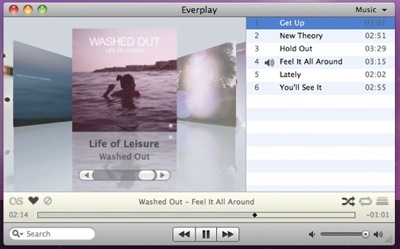
You can browse, search and play your iTunes music library and playlists in one Cover Flow window without launching iTunes. This is a screen real estate saver, which is important if you're working with a small screen -- says, on a MacBook or 13-inch MacBook Pro. What's more, play count and other iTunes metadata is automatically updated as soon as iTunes is launched by Everplay's background daemon.

In addition to the standard media Player features, Everplay also lets you create playlists on-the-fly using Everplay's song queuing feature: the Jukebox mode. You can double click track after track and it gets added to the queue. iTunes has a similar feature, but you have to deliberately begin playing a song from within a playlist or else start all over again.

Other features not provided by iTunes include visual Player notifications, global hot keys, a mini controller on the desktop, Growl support, speech announcements, and a fullscreen mode with album browsing capabilities. Heck, the app even supports the Apple Remote.

When it comes to Last FM, Everplay lets you "scrobble" your music to Last FM, "ban" and "love" tracks, share 'em with your friends, tag songs or leave an artist or user a "shout" in their Last FM shoutbox. (To "scrobble" a song means that when you listen to it, the name of the song is sent to a web site -- such as Last.fm) -- and added to your music profile.) This means Everplay also lets you listen to personalized radio based on your musical preferences, tags, Last FM recommendations or similarity with a certain artist. You can even listen to your friends and other users' online music libraries.

With Everplay's Similar Artists mode, you can use your iTunes music library as the starting point for discovering new music based on similarity with your favorite artists. Double click an album in the Cover Flow view to begin streaming similar artists from Last FM.

One thing to note: if you don't like Cover Flow (though I do), you probably won't like Everplay's interface. And if you don't use Last.fm a lot, this may not be your cup of tea.

If you do use Last FM regularly, you'll appreciate the ability to combine your iTunes library with your Last.fm stream.

There's also Twitter integration, so you can tweet about your playlists. However, I've never used this feature.

Everplay requires Mac OS X 10.5 or later and iTunes 7.5 or later. Last FM web services requires a free Last FM account. Radio services might require a Last FM subscription (for residents outside of the US).

Macsimum rating: 8 out of 10 (IF you use Last FM)

 
AAPL
$257.25
Apple Inc.
-0.86
GOOG
$484.85
Google Inc.
-0.14
MSFT
$25.81
Microsoft Corpora
-0.22
MacNews Search:
Community Search:

Animals’ World HD – iPhone App Review
Animals’ World HD ($3.99) Version – 1.0 Review – “Explore the animal kingdom in HD!” | Read more »
Wide Angle Review
Developer: Taylan Pince Price: $3.99 Version: 1.0.0 Design Rating: 3.75 out of 5 stars Features Rating: 2.75 out of 5 stars Integration Rating: 3 out of 5 stars Overall Rating: 3.17 out of 5 stars | Read more »
Gorillaz – Escape to Plastic Beach Revie...
Developer: Matmi Price: $1.99 Version Reviewed: 1.0 Graphics / Sound Rating: 3.4 out of 5 stars Game Controls Rating: 3.2 out of 5 stars Gameplay Rating: 2 out of 5 stars Re-use / Replay Value Rating: 1.95 out of 5 stars Overall Rating: 2.64 out of 5 stars | Read more »
Trackdance – Good For Apple Employee Par...
iWikiPhone.com’s newest release, Trackdance, is hoping to be all the rage at your next college party. “Trackdance allows your iPhone/iPod screen to display spectacular digital light shows to the beat of your music or music around you. You can also connect as many iPhones together as you like so the effect will appear over them all — great for... | Read more »
The Portable Podcast, Episode 43
Note to new listeners: welcome to the first episode of The Portable Podcast on 148Apps! | Read more »
Hotly Anticipated OmniFocus for iPad Rel...
Ok, so maybe hotly anticipated is a little overstated for most people. But very understated for task management nerds like myself. OmniFocus for the iPad has finally made it’s way into the App Store and I couldn’t be happier! This amazingly detailed task management application has been my most anticipated iPad application since the announcement... | Read more »
Ngmoco’s We Farm Is Out Worldwide, Get R...
Ngmoco’s latest entry into the freemium app craze, We Farm, is now available worldwide in the App Store. Like their other freemium hit, We Rule, “We Farm lets you cultivate, customize and control your very own virtual farm”, but it’s set in a farm instead of a medieval land. | Read more »
Fastar! Review
Developer: Cat-In-A-Box Games Price: $1.99 Version Reviewed: 1.0 Graphics / Sound Rating: 4.2 out of 5 stars Game Controls Rating: 3.9 out of 5 stars Gameplay Rating: 4.05 out of 5 stars Re-use / Replay Value Rating: 4.4 out of 5 stars Overall Rating: 4.14 out of 5 stars | Read more »
FaceTag – iPhone App Review
Facetag ($0.99) Version 1.0 Do you love taking photos of your friends and adding funny captions to them? Wouldn’t you love to be able to do this on the fly and then share your funny additions with your friends and family? If so then you may enjoy FaceTag, developed by MightyExcellentPosse. | Read more »
soundTable for iPad Review
Developer: GLUAK SRL Price: 0.99 Version Reviewed: 1.0 Device Reviewed On: iPad iPad Integration Rating: 3.75 out of 5 stars User Interface Rating: 4 out of 5 stars Re-use Value Rating: 3.5 out of 5 stars Overall Rating: 3.75 out of 5 stars | Read more »
All contents are Copyright 1984-2010 by Xplain Corporation. All rights reserved. Theme designed by Icreon.
Greetings, and welcome to the new MacTech web site! Our home page is designed to be your Industry Dashboard -- so you can have a snapshot of all that's relevant in the industry in one easy location. Many readers tell us that because the information is updated so frequently, they are now checking the site multiple times a day. Here's a quick run down of the features on the new web site, which can be subtle. We truly hope you register so that we can keep you up to date about new features as they are implemented. And, please use the BETA button in the top right to provide us any feedback, suggestions or bugs. We love to hear from you.