Gridiron Software’s Flow (http://www.gridironsoftware.com), which costs US$299) cannot be fully explained in this amount of space — it’s too vast and too valuable. Instead, I’ll tell you what it does and what it’s good for. In my testing, it works as promised, and beyond.
Flow is a “visual workflow manager” that keeps track of the relationships between all the files you use and gives you access to that data whenever you need it. You need Flow because even though applications such as InDesign and Illustrator remember the locations of the pictures and other assets you place into each document, they can’t keep track of every document that uses an individual asset. For example, if you create a logo, image, animation, movie, sound, etc., and then use it in 245 documents, only Flow can tell you which documents use that asset—even if it was exported to a PDF or PowerPoint file, or rendered to a movie. Without Flow, how could you possibly update every document that uses a specific logo or image?
Flow keeps track of every file placed within every other file, and every exported file generated by a file. And every version. So, it can answer the question, “Where did we get the text that was placed into the InDesign document that created the PDF I’m looking at right now?” It can even show you all the other PDFs that were generated from that InDesign document, and all the assets within those PDFs. It also keeps copies of files every time you save, so you can recover files from several revisions back. Of course, you have control over how many older files it saves to prevent your hard drives from filling up.
Flow tracks the time you spend actually using each application. Because it also tracks the relationships between files, it knows how much time you’ve spent on an entire project—automatically. You can manually or automatically export this data to any database or spreadsheet for billing calculations.
It’s almost universal: Flow works with every common creative app, including the Adobe Creative Suite, video- and sound-editing applications from Adobe and Apple, Microsoft Office, 3D apps, AutoCAD, CorelDRAW, Painter, text files, and any other file you choose to associate with a project—just drag it onto another document in Flow’s map to connect them. Gridiron Flow works on Quark Express and the full Final Cut Studio, as well. It’s compatible with Mac OS X 10.5 and above, and Windows XP, Vista and 7.
Given its complexity, Flow’s interface is as simple as I could imagine. The main Map window displays a flowchart that connects all the documents a file is related to. If you click a connected file, the map changes to show all the connections for that file. You can then click any file to open it.
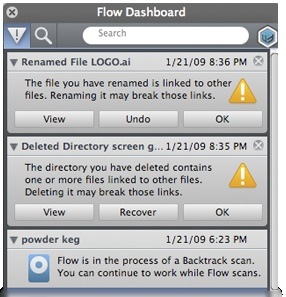
There’s an optional floating Dashboard window that keeps track of files you move (or delete!) that are being used by other documents. This display updates in real time as you move files around on your hard drive. You can also display a similar window in any CS3 or CS4 application as you work on documents. This window shows all the assets that depend on the current file, all the versions of that file, time spent working on that file, etc.
Amazingly, workgroups can even share a Map so that everyone sees changes to all the files in a project as they’re made. For $133 per member of your workgroup, Flow will quickly repay you many times over.
Rating: 8 out of 10