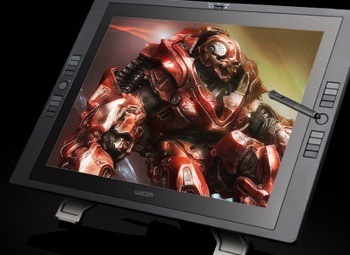
Wacom (http://www.wacom.com) has introduced the Cintiq 21UX, its interactive pen display delivering pen performance and ergonomics in a LCD display. It’s designed for professional photographers, designers, artists and animators.
The Cintiq 21UX offers 2048 levels of pressure sensitivity. Other enhancements include rear-mounted Touch Strips placed for fingertip access while working. Each Touch Strip has an accompanying thumb-controlled Touch Strip Toggle button that controls up to four different user-assigned functions per application such as zoom, scroll, brush size adjustment and canvas rotation.
The Cintiq 21UX Grip Pen features Wacom’s new proprietary Tip Sensor technology, offering users near-zero (one gram) starting pressure for the most sensitive interactive pen display performance to date, according to Don Varga, senior product manager for Wacom Technology. The Grip Pen also features a pressure-sensitive eraser and two customizable side switches that can be customized for commands such as double-click and right-click.
The customizable, application-specific ExpressKeys — eight located on each side of the display’s bezel — are instrumental in helping improve workflow and boost productivity by placing commonly used commands at the fingertips. Pressing the top ExpressKey brings up an on-screen display showing the settings of all the ExpressKeys and Touch Strips.
Also new to the Cintiq 21UX is the introduction of two user-defined, four-function Touch Strip Toggle buttons, which control the function of their associated Touch Strip, located on the back of the bezel. The position of an illuminated LED located along the perimeter of the Toggle button indicates the current function of the Touch Strip. Fully application-specific, the Touch Strips can be used for up to four functions such as zoom, scroll, brush size adjustment and canvas rotation per application.
This new ergonomic treatment allows users to “toggle” with their thumbs while using their forefinger or middle finger to control Touch Strip speed and variation. Additionally, locating the Touch Strips on the back of the pen display rather the front helps prevent accidental contact with the pen hand when, for example, flowing brush strokes are employed and extend beyond the screen’s border.”
The Cintiq 21UX’s stand allows users to recline the pen display at any angle between 10 degrees and 65 degrees. In addition to reclining, the Cintiq 21UX can be rotated up to 180 degrees in either direction. If desired, users can remove the Cintiq from the stand for use on a table top or to attach it to an articulating arm (not included) using the standard VESA (Video Electronics Standards Association) mounts located on the back of the display.
A new weighted pen stand is not only a pen holder, but doubles as a twist-off storage compartment for pen nibs and handy nib removal tool. Standard, felt and stroke nibs are provided.
The Cintiq 21UX ships such software as Corel Painter Sketch Pad; Nik Color Efex ProTM 3.0 WE6 and Wacom Brushes 3.0 for 81 customized brushes for use with Adobe Photoshop CS + and Photoshop Elements 4.x.
The Cintiq 21UX, priced at US$1,999, will begin shipping in the US, Canada and the majority of Latin America countries in late March or early April. It will be available in Argentina, Brazil and Chile in early summer due to certification requirements in those countries.